Showing posts with label MTK 6592. Show all posts

[MT6592] AOSP Validus ROM Port For All Mediatek


[MT6592] AOSP Validus ROM Port For All Mediatek

AOSP Marshmallow Rom For All MT6592


Good News for all MTK 6592 Octa Core Users, Some of the Users have ported the Android Marshmallow 6.0.1 Rom for this Chipset.

This Rom has to be ported for any Android running 4.4.4 Device with Kernel 3.4.67

Its for daily use firmware. See below for working list and not working list.

Whats Working :

Camera
Video
Audio
Bluetooth
Calls
3G and 4G
WiFi
Hotspot
GPS
Dual Sim
Microphone

Whats Not Working :

VPN

Download AOSP Validus ROM For MTK 6592 :

Click Here For ROM
Click Here For GApps

[MT6592] Stable MIUI 7 ROM For XOLO Play 8x-1100


[MT6592] Stable MIUI 7 ROM For XOLO Play 8x-1100

MIUI 7 ROM For XOLO Play 8X-1100


Hello, People In this we have got the MIUI 7 Stable rom for XOLO Play 8X - 1100 Mobile. Its was mainly ported for experiencing Super Smooth Operating System than Stock Rom.

This is a stable version, so no more bugs in this rom you can use it has daily driver without any troubles.

Note : Please Install it with your own risk we will not responsible for any kind of damages happen to your device.

MIUI 7 ROM Features:

Super Smooth OS Like iOS
Pre-Installed Dolby Atmos
Rooted with SuperSU
Viper4Android
Added So Many Tweaks
etc...

Click Here To Download MIUI7 Rom For XOLO Play 8X-1100 


[MT6592] AOSP 6.0.1 Slim ROM For All Mediatek


AOSP Marshmallow ROM For All MTK6592 Devices

AOSP Marshmallow ROM For All MTK6592 Devices


Slim Roms are light weight and performance based custom roms. which desgined from Android Open Source Project (AOSP)

This was the best alternative rom for Stock rom. it give you the rich features you can customize the way you like.

Note : Install with your own risk, we are not responsible if anything wrong happens to your device.

Features :


Slim Launcher
Slim Center
Slim File Manager
Slim Headsup
Dark Theme
Camera - True View and Smart Capture
Slim PIE
Status Bar Tweaks
and Many...

Download Slim AOSP 6.0.1 For MTK 6592 :

Click Here


Installation For MT6592 Devices :


User Must Port Some Files from stock rom to this ROM
Then it will bootup without any BUG..

PhilZ Touch Recovery For All Mediatek (MTK Devices)

 PhilZ Touch Recovery For All MTK (MT6572, MT6582, MT6589, MT6592...)

PhilZ Touch Recovery For All MTK (MT6572, MT6582, MT6589, MT6592...)


Everybody wants a custom recovery on their phones for flashing custom ported apps, mods and tweaks etc...so if you have bought a non popular device with no developments on XDA etc..so this post is for you.

In this post we will teach you how to get Philz Touch Recovery for all MTK Devices.

Let's See what features Included :


Its a Modded CWM Recovery
Supports SE LINUX
Built in AROMA File Manager
Backup/ Restore Feature
Will work on all android devices
and much more...

Let's Begin the Steps :

First you have to download Philz Recovery Click Here
Copy it to your Desktop Folder
Extract the ZIP File
Now Open the .exe File and begin the steps..
that's all Folks it will automatically port Philz touch Recovery and Flashes into your MTK Device.

TWRP Recovery for all MediaTek (MTK6572/ 6582/ 6589/ 6592) Devices

 How to Get TWRP Recovery for all Mediatek Devices


Finding TWRP (Teamwin Recovery Project) for all your mediatek phones is difficult. not everybody creates a recovery for you and in these days only few developers are using mediatek phones. so they will develop for their mobiles.

So Here in this post we will show you how to create TWRP Recovery for all Mediatek Devices.

Procedure :

1. USB Cable with Mediatek Phone
2. Easy Magic TWRP Installer (Click Here)
3. ADB Drivers Needed (Click Here)
4. Enable USB Debugging on your device

How to Get TWRP For your Mobile :

First You have to root your mediatek device and then enable the USB Debugging mode on your device then connect it to your Computer.

After that open the Easy Magic TWRP Installer and click  Next Option...


After the END it will ask you to Press "YES" for Auto Mode and "NO" for Manual Mode. So press YES this will automatically creates Fresh TWRP for your Device and Flash directly to your Phone.

Permanent IMEI Fix Solution for All Mediatek MTK6572/ 6582/ 6589/ 6592


How to Permanent IMEI Fix Solution for All Mediatek MTK6572/ 6582/ 6589/ 6592...


Fixing IMEI Permanent on Mediatek Devices is not very easy. If you fix IMEI your self by using Mobile Uncle tools or something is a temporary process it will show No IMEI when you Format your MTK Devices.

So in this post we will show you the permanent IMEI Write Solution that works even if your format your mediatek devices.

IMEI is Known as International Mobile Station Equipment Identity that is a unique 15 digit number for each mobile phone. if this lost or not available in your device then your sim will not work untill you fix  your IMEI.

Required tools for fixing IMEI :


Windows PC and Losted IMEI MTK Mobile Phone

DATA Cable and MTK USB Drivers

MauiMETA 3G Software Click Here

SP Drivers Click Here

CDC Driver Click Here

Modem Files Click Here

Steps to do :

1. Enable USB Debugging Mode on your Device and connectg to your PC

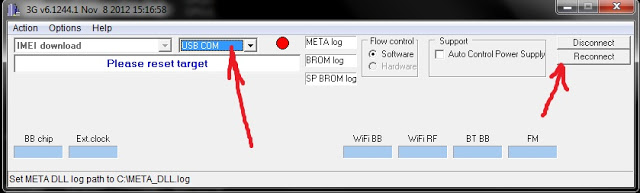
2. Install MauiMETA 3G on your PC. Open and select USB Com on Options


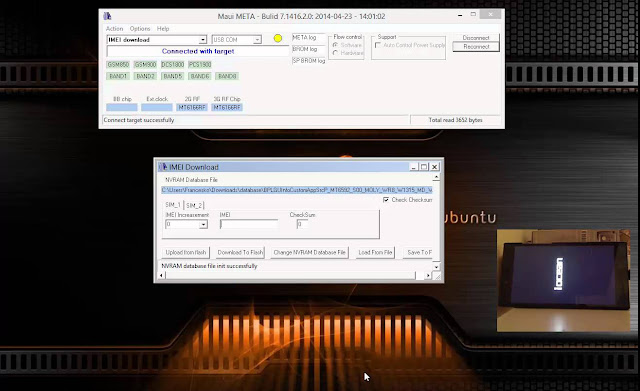
3. Switch off your phone and connect while pressing reconnect button as shown in the above image. and press dropdown option and select IMEI download after that you will get popup called IMEI Download. click change NVRAM Database File. and add your MTK Modem.


4. write your IMEI Number and Click Download IMEI Option that's all you have successfully Fixed your IMEI Permanent.